Admin panels
Custom admin panel development
Do you track customers, appointments or orders in separate spreadsheets, emails and notes? I build a custom admin panel where you and your team manage, search and update everything in one place.
Price indication Price on request
- Reply within 1 working day
- Fixed price up front
- One dedicated developer
// live demo
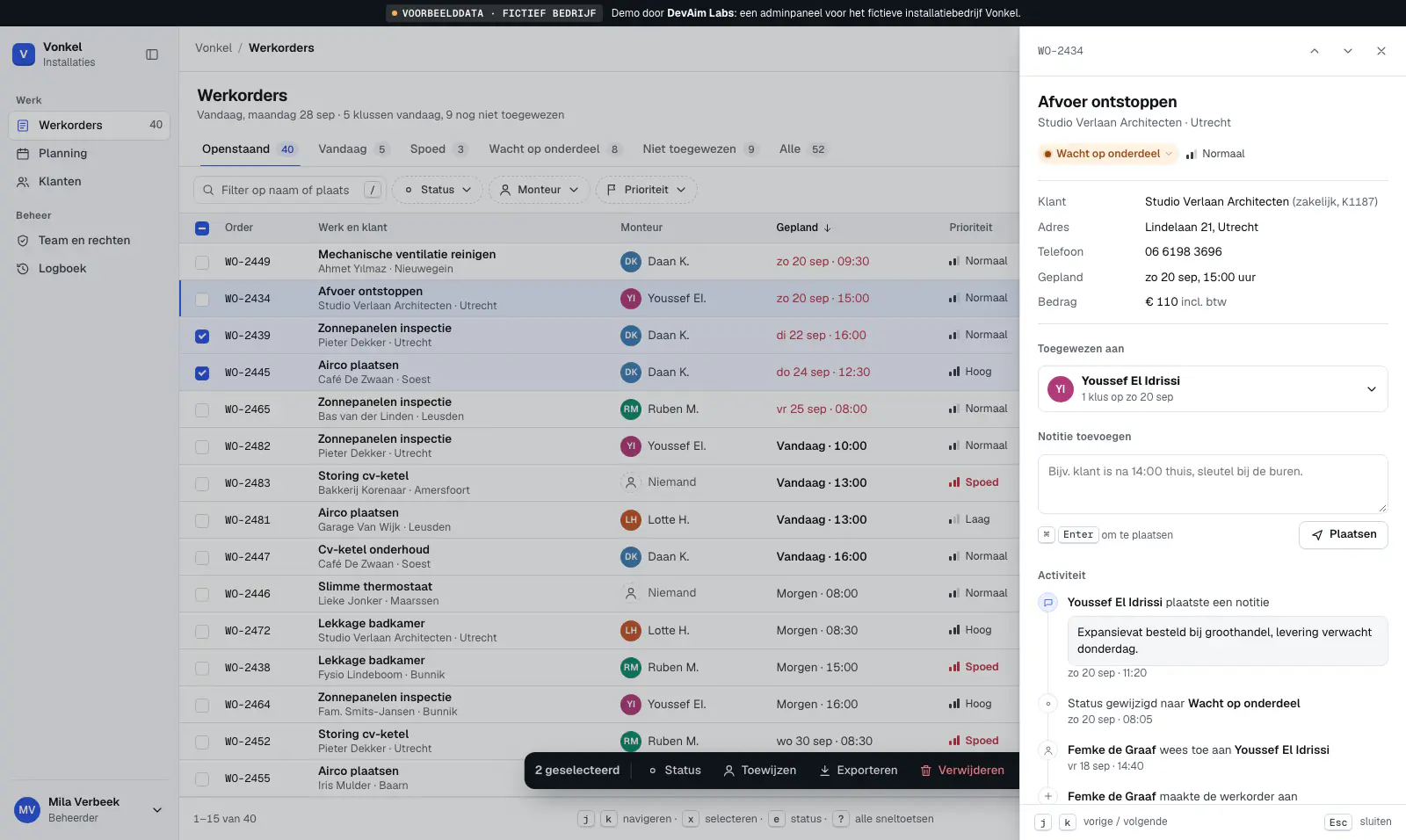
Work orders, planning and permissions for a fictional installation company
Try it: press Ctrl+K (⌘K) and search for a customer, filter by status, select a few rows, or switch to 'Monteur' (technician) at the bottom left and see what disappears. The same pattern works for customers, orders, appointments, cases or stock. The demo itself is in Dutch.
Loading demo…
Works best on a larger screen.
Works best on a larger screen.
This is a working example of a fictional business with fake data. No real payments or personal data are processed.
What you get
One place for your data and your team
Built around how you work, not the other way round. You can see most of it in the demo.
-
Everything in one overview
Your data in one clear list, instead of spread across files and inboxes.
In the demo The work order list with saved views.
-
Search and filter
Find what you need in seconds, by name, status, date or any field that matters to you.
In the demo The search box, filter chips and Ctrl+K.
-
Statuses and actions
Change a status, assign work or update several rows at once, and always see where things stand.
In the demo Click a status label, or select rows for bulk actions.
-
Detail view with history
Everything about a customer or order together, including notes and earlier activity.
In the demo Click a row: assign, notes and activity.
-
Roles and permissions
Everyone sees and does only what fits their role. Optionally with a log of who changed what.
In the demo "Team en rechten", and "Bekijk als" at the bottom left.
-
Links with your systems
Data from your website, calendar or accounting comes in automatically, with no retyping.
Who it is for
Is this a fit?
A good choice if
- You track customers, orders, appointments or stock in spreadsheets or separate tools.
- Several people work with the same data and you want to avoid errors and double work.
- Off-the-shelf software doesn't quite fit how your business works.
Not the right choice if
- An existing package already does almost everything you need: configuring it is cheaper than building.
- You only need a shared spreadsheet for a few people.
Process
See it first, then build
You see a working version early, so the system fits how you really work.
-
Intro
We walk through how you work now: which lists exist, who does what and where it gets stuck.
-
Clickable prototype
You first see a working first version with example data, like the demo above, and steer it.
-
Build in rounds
I build in short rounds. After each round you see a working version and we can shift priorities.
-
Launch and grow
Your existing data moves over, your team starts using it and I stay available for extensions.
Pricing
What does an admin panel cost?
It often starts with a compact first version that grows over time. After a free intro call you get a fixed price.
Price indication
Price on request
Fixed price up front, after a free intro call.
What drives the price
- How many kinds of data and screens are needed
- Roles, permissions and who may see what
- Links with existing systems
- Moving over existing data
- Reports and exports
FAQ
Good to know
What does a custom admin panel cost?
It depends on the number of screens, roles and integrations. After a free intro call you receive a fixed price. It often starts with a compact first version that grows over time.
Why not an off-the-shelf package?
If an existing package fits well, I will honestly recommend it. Custom work pays off when you would otherwise have to bend your way of working to the software, or pay for lots of features you don't use.
Can my existing spreadsheet data go in?
Yes. I move your existing lists into the new system and check with you that everything is correct before you switch.
Can I control who sees what?
Yes. With roles and permissions you decide per team member what they can see and change.
Does it work on a tablet or phone?
The admin panel runs in the browser, so there is nothing to install. Screens for on the go, such as a list or a detail view, I make work on tablet and phone. For large overviews a bigger screen works best.
Is my data safe?
I build with a personal login per user, encrypted connections and permissions per role. Hosting in the EU is possible. You remain the owner of the data and the code.
Who owns the code?
You do. After delivery you receive the complete source code and documentation, so you are not locked into one vendor.
Don't see your question? Ask me directly
Related
Often combined with
Contact
Book a free call about your admin panel
Briefly describe how you work now and where it gets stuck. I reply within 1 working day.
Prefer direct contact?
- Email: contact@devaimlabs.com
- Phone: +31 6 38 52 30 99
- Reply within 1 working day