KPI dashboards
Custom KPI dashboard development
Do you spend hours every week pulling numbers together from different systems? I build a dashboard that puts your key figures on one screen automatically, so you see how things are going sooner.
Price indication Price on request
- Reply within 1 working day
- Fixed price up front
- One dedicated developer
// live demo
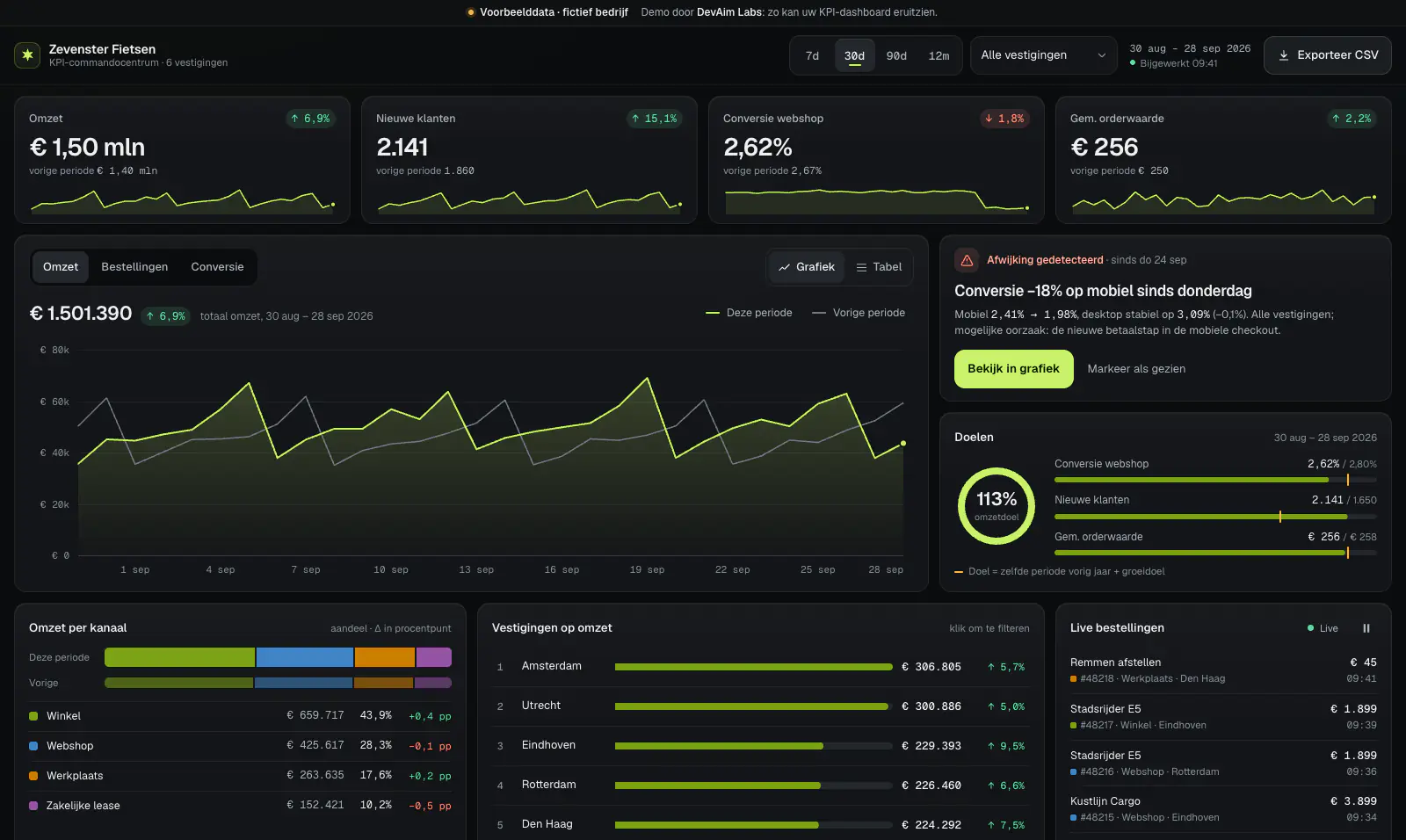
The KPI command centre of a fictional chain of 6 bike shops
Try it: switch between 7 days and 12 months, filter by a shop and click "Bekijk in grafiek" (view in chart) on the anomaly. For your business it could be enquiries, appointments, hours or stock instead. The demo itself is in Dutch.
Loading demo…
Works best on a larger screen.
Works best on a larger screen.
This is a working example of a fictional business with fake data. No real payments or personal data are processed.
What you get
The numbers you need, without manual work
A dashboard that answers your questions. You can see every part below in the demo.
-
The KPIs that matter to you
Together we choose the figures that fit your goals, instead of everything that can be measured.
In the demo The four KPI cards at the top, with a trend line and the change against the previous period.
-
Trends in charts
Revenue, orders or enquiries per day, week or month, so you see where things are heading.
In the demo The chart with revenue, orders or conversion, next to the previous period.
-
Compare periods
Switch between the last week, month, quarter or year in one click.
In the demo The period picker: 7d, 30d, 90d or 12m.
-
From total to detail
Click through from a figure or an anomaly to what lies behind it.
In the demo Click a shop in the ranking, or "Bekijk in grafiek" on the anomaly.
-
Insight per channel or location
See which channel, product, team or location contributes most.
In the demo The "Omzet per kanaal" and "Vestigingen op omzet" blocks.
-
Updated automatically
Data comes straight from your webshop, till, CRM or accounting. No more exporting and pasting.
In the demo "Bijgewerkt 09:41" at the top and the live orders at the bottom right.
Who it is for
Is this a fit?
A good choice if
- You pull together figures from several systems by hand every week or month.
- You want to see how things are going sooner, without waiting for a report.
- Your data lives in systems with an API or export, such as a webshop, till, CRM or accounting.
Not the right choice if
- Your current software already has a report that shows exactly what you need.
- There is no digital data to show yet: then an admin panel or integration is the logical first step.
Process
From question to dashboard
We start with the decisions you want to make, not with the charts.
-
Intro
Which decisions do you want to make with the dashboard, and which figures do you need for them?
-
Map the data
I look at where your data lives and how it can come in reliably.
-
Prototype with example data
You see a clickable first version with example data and steer the content and layout.
-
Live with real data
The dashboard is connected to your systems and stays up to date automatically.
Pricing
What does a KPI dashboard cost?
The price mostly depends on where your data comes from. After a free intro call you get a fixed price.
Price indication
Price on request
Fixed price up front, after a free intro call.
What drives the price
- The number of data sources and integrations
- How often the figures need refreshing
- The number of screens, KPIs and filters
- Access per user or team
- How clean and consistent your existing data is
FAQ
Good to know
What does a custom KPI dashboard cost?
It mostly depends on the number of data sources and integrations. After a free intro call you receive a fixed price.
Isn't Power BI or Looker Studio enough?
Sometimes it is, and then I will say so. A custom dashboard pays off when you want to combine figures from systems without a standard connector, when it has to fit your way of working exactly, or when it has to run in your own environment.
Which systems can the data come from?
From almost any system with an API or export: webshops, till systems, CRM, accounting, payment providers such as Mollie and Stripe, or your own database.
How up to date are the figures?
You decide. Data is often refreshed every hour or every night; where needed, it can be near real time through webhooks.
Can I control who sees what?
Yes. You set per user or team which figures are visible.
Does the dashboard work on my phone?
I make the key figures easy to read on a phone. For charts and tables a bigger screen works best, as with the demo.
What if I want to see other figures later?
Then we extend the dashboard. The code is yours, so you are not locked into one vendor.
Don't see your question? Ask me directly
Related
Often combined with
Contact
Book a free call about your dashboard
Briefly describe which figures you pull together now and where they live. I reply within 1 working day.
Prefer direct contact?
- Email: contact@devaimlabs.com
- Phone: +31 6 38 52 30 99
- Reply within 1 working day